
Scan and review for free
See supported storage categories and inspect findings before buying. Scanning removes nothing; cleanup requires a license and confirmation.
See the native app and review workflow →AVAILABLE FOR MACmacOS 14+ · Intel and Apple Silicon
Make room. Keep what matters. Purrge maps your storage and helps you review caches, leftover app files, duplicates and developer clutter. Selected files are permanently deleted only after confirmation.
$14.50 once · 2 Macs · Lifetime updates · Launch price for the first 250 orders, then $29
Purrge 1.0.0 (build 21) · macOS 14+ · Intel and Apple Silicon · Free to scan. License required for cleanup.
Purrge for Mac · Conceptual mockup · example data
Let’s see which temporary files you could clear. You choose what goes. Scanning doesn’t delete anything.
Checks known Home-folder locations.

See it before you decide
See supported storage categories and inspect findings before buying. Scanning removes nothing; cleanup requires a license and confirmation.
See the native app and review workflow →Selected files are permanently deleted, not sent to the Trash. Read the current release notes and keep backups before confirming removal.
Read what changed in Purrge 1.0.0 →Move eligible folders to APFS, Mac OS Extended or exFAT storage. Apps need APFS or Mac OS Extended. Copies are verified; the original is kept until you confirm.
Check relocation requirements and limits →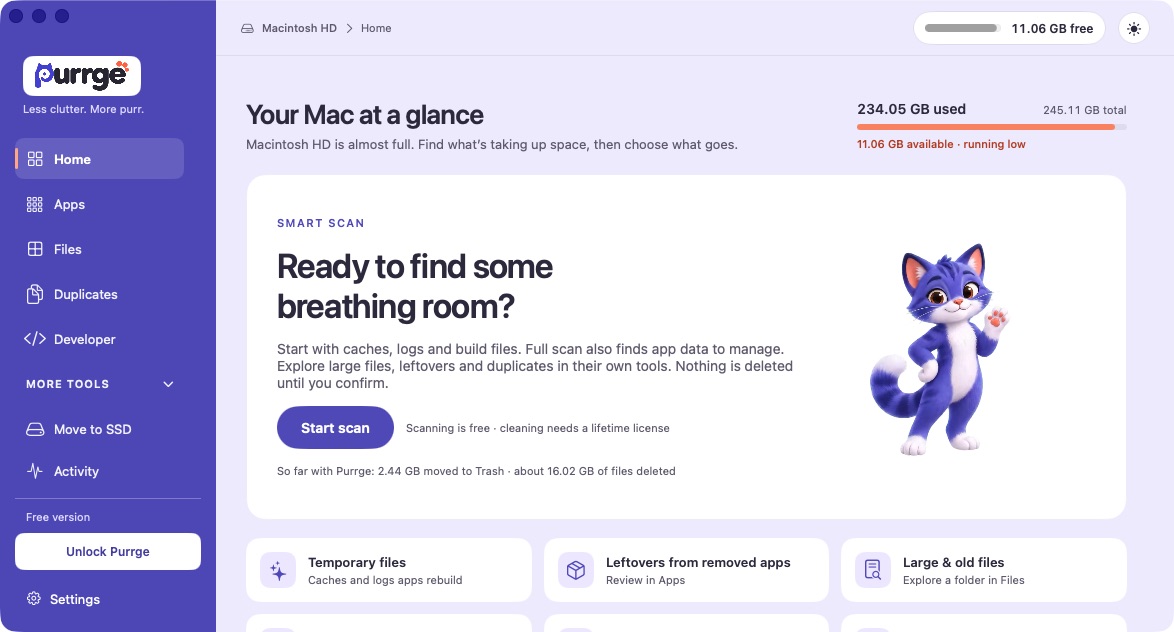
How it works
Purrge behaves like a tidy cat: it looks first, decides nothing for you, and leaves no mess behind.

Purrge maps every folder you point it at and shows what is taking space, including the parts macOS keeps out of sight.
Scanning only reads. It never deletes.

Every item comes with context: what it is, what created it, and why it may be safe to remove. You pick what goes.
Age, a filename or identical content alone never marks a file as removable.

Review your selection and confirm permanent deletion. Purrge validates the files again before removing them.
Deleted files do not go to the Trash and cannot be restored by Purrge.
Interactive preview
Pick an area to see how Purrge handles it. Names and sizes below are example data, not a live scan.
Purrge finds supported app caches and build outputs that apps regenerate on their own, and shows what created each one and how much space is involved.
SafetyOnly supported, understood locations are offered. The scan itself deletes nothing.
Conceptual mockup · example data, not a live scan or a screenshot.
Safety & privacy
Six rules Purrge follows every time. They are not settings — they are how the app works.
A scan reads and measures. It changes nothing on your disk.
Cleanup happens only when you select items and confirm. Validation runs again before anything moves.
Nothing goes to the Trash. Review your selection and keep backups; deletion cannot be undone.
Age, a filename, or identical content alone never marks a file as safe to remove.
Verified eligible app data can be preselected — deselect anything you want to keep. Selected settings and saved data are permanently deleted too.
When moving eligible folders to supported external storage, the original copy stays until the new copy is verified and you confirm it works.
Permissions
It is a broad permission, so Purrge works without it. Grant it when you want the complete picture; with limited access some locations are skipped and Purrge tells you when that is the case.
Read about permissions →Privacy
Scans and file inventories never leave your machine. This website remembers your cookie choices for 180 days; optional advertising measurement requires your consent. Optional app usage analytics is on for new installs and can be turned off in Settings.
Legal & privacy hub →Compare
Both offer a one-time purchase. Purrge focuses on storage, developer files and eligible SSD moves; CleanMyMac adds broader maintenance and protection tools.
| What you get | Purrge | CleanMyMac |
|---|---|---|
| Price | $14.50 one-timelaunch price · $29 regular · USD | ₹2,885 / year (INR)or ₹7,701 once · 1 Mac |
| Licence coverage | 2 MacsLifetime updates | 1 Mac at the prices shownOne-time: purchased major version |
| Visual storage map | Included | Included |
| Cache & build-file cleanup | Included | Included |
| App removal with associated files | Included | Included |
| Exact duplicates, keeper protected | Included | Equivalent workflow not verified |
| Developer storage: environments, dependencies, caches, models, worktrees | Included | Xcode junk cleanup included |
| Verified relocation to supported external storage | Included | Equivalent workflow not verified |
| Confirmation before permanent deletion | Included | Varies by tool |
| Subscription required | Never | No · one-time or subscription |
CleanMyMac prices shown in INR for one Mac in MacPaw’s India store session, checked 21 October 2026: ₹2,885 per year or ₹7,701 once. Purrge is priced in USD for two Macs. Currency, taxes, offers and final checkout totals may differ. No currency conversion or savings ratio is implied. Check MacPaw’s current price. Read the feature comparison.
Pricing
One license, every feature. The first 250 orders are 50% off at $14.50; after that the price is $29.
Launch · −50%
Purrge · full license
$14.50$29You save $14.50
One-time purchase. No subscription, no renewal.
Launch price for the first 250 orders. Then $29.
$14.50 once · 2 Macs · Lifetime updates
Get Purrge for $14.50One-time payment, no renewal · macOS 14+, Intel and Apple Silicon · License & refund terms
Compare purchase options
Both offer a one-time purchase. Match the device count, update coverage and final checkout currency before choosing.
CleanMyMac prices shown in INR for one Mac in MacPaw’s India store session, checked 21 October 2026: ₹2,885 per year or ₹7,701 once. Purrge is priced in USD for two Macs. Currency, taxes, offers and final checkout totals may differ. No currency conversion or savings ratio is implied. Check MacPaw’s current price.
Read the full comparison →Scanning never deletes. Review every cleanup selection before confirming: deletion is permanent and cannot be undone. Keep backups of files you need.
Yes. The interactive preview walks through every area of the app with example data.
Yes. The first 250 orders are $14.50 instead of $29 — 50% off, applied at checkout. It is a fixed number of discounted orders, not a deadline: after those orders the price is $29. Same app, same license, no subscription either way — the only thing that changes is how early you buy.
Map it, understand it, and clear only what you choose. Scans stay on your Mac. Permanent deletion always asks for confirmation.
$14.50 once · 2 Macs · Lifetime updates · Launch price for the first 250 orders, then $29
FAQ
No. Scanning only reads and measures. Nothing moves until you choose a cleanup action, and Purrge validates your selection again before anything is removed.
Since Purrge 0.6.0, cleanup permanently deletes selected files after confirmation. They do not go to the Trash, and Purrge cannot restore them. Keep backups. Freed space is an estimate because snapshots and shared blocks can still occupy space.
It does not guess from age, filename, or identical content alone. Items are matched against supported, understood locations — such as app caches and build outputs — and shown with context. You make the final call.
When you remove an app, verified eligible associated data can be preselected. You can deselect anything you want to keep. Whatever stays selected — including settings and saved app data — is permanently deleted with the app. Shared and uncertain data is excluded.
It lets Purrge see protected locations for a complete picture. It is a broad permission, not just permission to read file sizes, so it is optional: with limited access some locations are skipped and results may be incomplete.
Scans and file inventories are processed on your Mac. This website remembers your cookie choices for 180 days; optional advertising measurement requires your consent. Optional app usage analytics collects coarse usage events and is on by default for new installs from version 0.4.1. Turn it off in onboarding or Settings. Existing choices are preserved; see the privacy policy for details.
Yes. Download Purrge 1.0.0 for Intel and Apple Silicon Macs running macOS 14 or later. The app is signed and notarized by Apple. Scan and inspect your storage for free; a license unlocks cleanup and SSD relocation.
No. Eligible ordinary folders can move to writable external APFS, Mac OS Extended or exFAT drives. Eligible apps need APFS or Mac OS Extended; exFAT supports folders only. Photos libraries, managed environments, Docker data and tool caches need supported migration methods. Purrge verifies the copy and keeps the original until you confirm it works.
No. Modification time does not show when a file was last used. Age, filename or a duplicate match alone does not authorize removal. Inspect the context and keep what you still need.
$14.50 one-time for the first 250 orders; after that the regular price of $29 applies. The offer is limited by order count, not by a date — there is no countdown and no closing date. There is no subscription either way. License and refund terms live in the legal hub.
Purrge is DiskBreeze with a new name and the same careful approach — same rules about what gets touched and what does not. Some internal identifiers keep the old name for compatibility.