
Choose Purrge for focused storage review, developer files, and eligible moves to an external SSD. Choose CleanMyMac for a broader maintenance suite, including malware protection and app updates. Both offer a one-time purchase.
Start with a free storage scan.
See what’s taking space before deciding what to keep. Scanning and inspection are free; cleanup and SSD moves require a licence.
$14.50 once · 2 Macs · Lifetime updates
macOS 14+ · Intel and Apple Silicon
Before using cleanup: Purrge 0.9.0 fixes Stop waiting so it cancels Quit & Clean before deletion. If you have 0.8.0, update first. Read about older versions.
On this page
We make Purrge. This compares published features and terms, not independent tests or speed benchmarks. Reviewed on 21 October 2026 against the shipped Purrge 1.0.0 (build 21), its release evidence and the official MacPaw sources below. Older screenshot dates and the 0.8.0 cleanup warning are labelled separately.
CleanMyMac vs Purrge at a glance
The main distinction is scope. Purrge concentrates on finding, reviewing, deleting, and relocating storage. CleanMyMac also offers protection and maintenance. This table compares Purrge’s published release with MacPaw’s direct-store product; features can differ in other CleanMyMac editions.
| Your priority | Purrge | CleanMyMac |
|---|---|---|
| See what takes space | Visual storage map and file review | Space Lens storage map |
| Clean up files | Supported caches, app leftovers, and exact duplicates | System junk, app removal, and duplicate-file tools |
| Developer storage | Dedicated view by tool and project | Xcode junk and other supported caches in Cleanup |
| Keep files on an SSD | Dedicated Move to SSD workflow | No equivalent verified in the sources reviewed |
| Malware protection | Not a malware scanner | Protection tools included in the advertised suite |
| Try before paying | Free scanning and inspection; paid cleanup and relocation | Advertised 7-day trial; check enrolment and renewal terms |
| Licence choices | One-time purchase, two Macs, lifetime updates | Monthly, annual, or one-time; choose device count |
| Minimum macOS | macOS 14 | macOS 11 |
Sources: Purrge release details, CleanMyMac features, MacPaw’s system-junk guide, and Space Lens documentation.
What do the prices and licences include?
Purrge’s published price is $14.50 once. The launch offer applies to the first 250 orders, then the regular price is $29. One licence covers two Macs and lifetime updates, with online activation. See the current Purrge pricing and licence terms before buying.
On 21 October 2026, MacPaw’s store displayed ₹2,885 per year or ₹7,701 once for one Mac in our India browsing session. It also offered monthly billing and plans for two or five Macs. These are regional displayed prices, not US-dollar quotes. Currency, tax, promotions, and checkout totals can differ.
The licence distinction matters more than a large savings headline. MacPaw’s purchase-options guide says a one-time licence does not expire, but includes updates for the purchased major version. Future major upgrades may cost extra. Its subscriptions include major upgrades while subscribed. Purrge’s published offer includes lifetime updates.
Compare the same purchase
Set the same device count, check the final currency and tax, and choose either annual billing or one-time payment. A one-Mac subscription total is not a fair substitute for CleanMyMac’s one-time option. We haven’t converted these regional prices or assumed future renewal prices.
The Purrge offer is limited by order count, with no advertised end date. This article cannot tell you how many discounted orders remain. The amount on the hosted payment page is the amount to check before you pay. Also read the refund conditions; a low purchase price does not make every purchase refundable.
What can you review before paying?
You can download Purrge and scan and inspect storage for free. Cleanup and SSD relocation require a licence. That makes the free review useful for a concrete question: does Purrge find the folders you care about, and do its explanations help you decide what to keep?
Interactive demonstration · example data
From scan to a considered next step.
A short illustration of Purrge’s workflow. This is not a live scan or a recording of the app. Nothing here accesses or changes your files.
Animations are paused. Use the three step buttons to explore.
See where your space goes.
Scan and inspect your storage for free. Scanning reads and measures; it does not delete files.
45.5 GB across these example items
- Xcode DerivedData18.4 GB
- Homebrew download cache3.1 GB
- Project archives24 GB
Measured space is not necessarily space you should remove.
CleanMyMac advertises a seven-day trial. Review the trial’s payment and renewal terms when signing up. A time-limited trial and Purrge’s free storage review give you different ways to evaluate the product; neither should be described as unrestricted free cleanup.
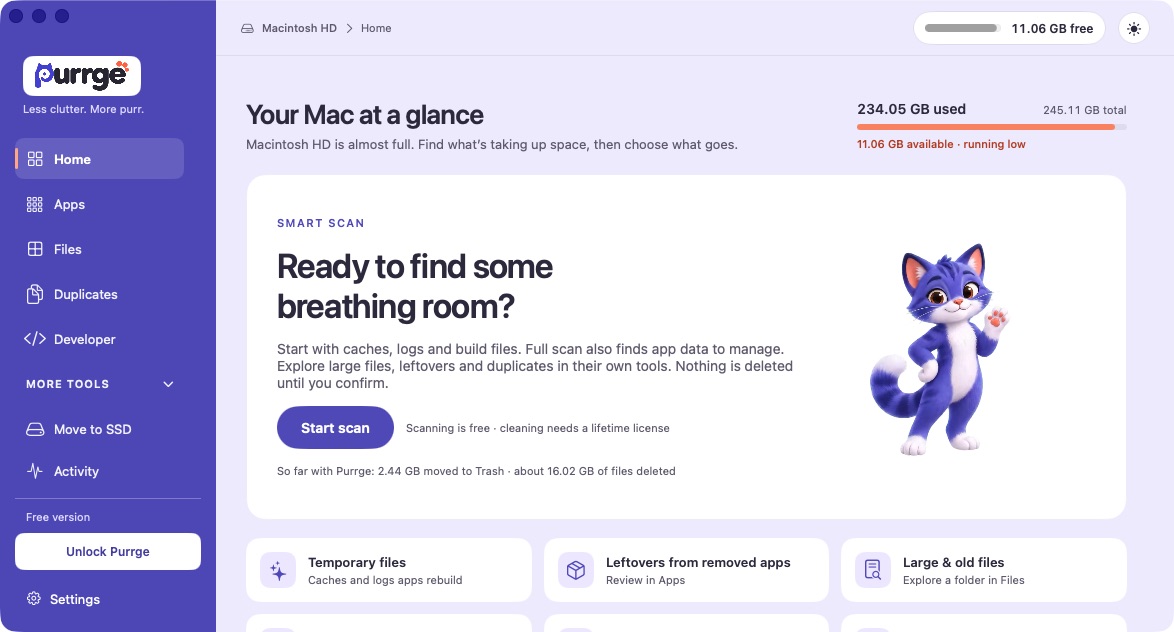
Both products let you investigate storage before committing to removal. MacPaw documents a review list for system junk, including caches, logs, and Xcode files. Purrge 1.0.0 offers a simpler Home scan-to-cleanup flow: review selected temporary files, decide whether to close open apps, then confirm permanent deletion. Its Apps view adds normal Quit & Uninstall and supported vendor-uninstaller handoffs. App removal and exact-duplicate review retain their own eligibility checks. We haven’t measured which product finds more removable bytes on an identical Mac.
Reclaimable space also depends on what you still need. Removing a cache can mean a later download or rebuild. App leftovers can include settings and saved data. Read the selected paths and explanations instead of treating the largest total as a recommendation.
How does Developer storage differ?
Purrge 1.0.0 retains the dedicated Developer view introduced in 0.8.0, with 16 tool groups, project build folders, and explained cleanup actions. The release notes describe protection for linked source files and active Claude Code versions. This view is useful when your storage question starts with a project or tool.
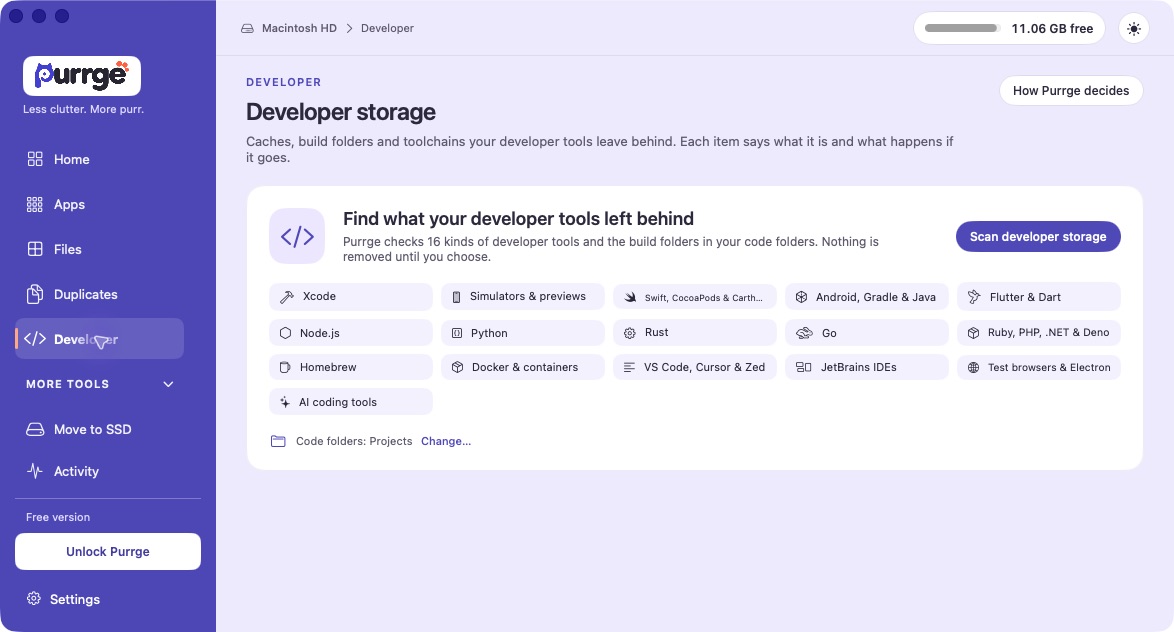
CleanMyMac also handles developer-related storage. Its system-junk documentation includes Xcode junk and notes selection rules for module caches and archives. It would be inaccurate to say CleanMyMac has no developer cleanup. The difference presented here is Purrge’s dedicated organization by tool and project, not a claim of exclusive cache support.
For example, a Docker disk can contain databases as well as disposable build caches. Seeing its size does not make the entire disk safe to delete. Purrge distinguishes items it can clean from items managed by their own tools. If your goal is a smaller development environment, review that distinction before choosing an action.
Can you keep the files and move them to an SSD?
Purrge’s Move to SSD is for files you want to keep. Its 0.7.0 release notes describe moving eligible apps and folders to external storage, verifying the copy byte for byte, then asking you to confirm before freeing the original space. Folders keep a link; apps use a small launcher.
In Purrge 1.0.0, eligible ordinary folders can move from internal storage to a writable external APFS, Mac OS Extended or exFAT drive. Eligible apps require APFS or Mac OS Extended; exFAT supports folders only. Photos libraries, virtual machines, Docker data, managed tool storage and protected locations are not ordinary-folder relocation candidates. Use the app’s eligibility checks rather than assuming any folder or app can move.
The workflow includes Undo while the original backup remains, and Move back for returning moved content. Verification keeps that original copy until you test the moved item and explicitly confirm freeing its space. Moved content needs its external drive connected. A changed original, interrupted operation or conflicting path can require recovery instead of an automatic undo.
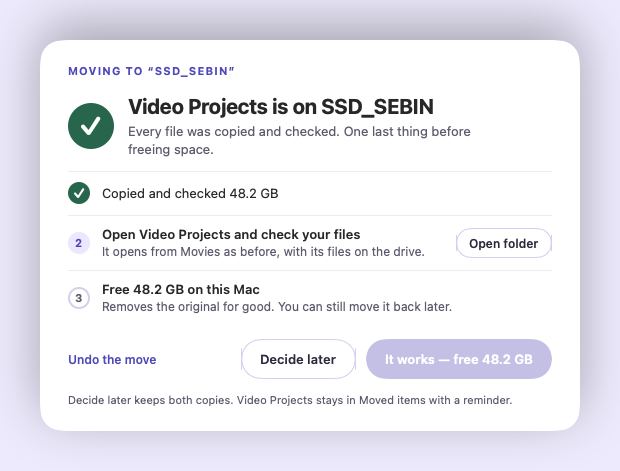
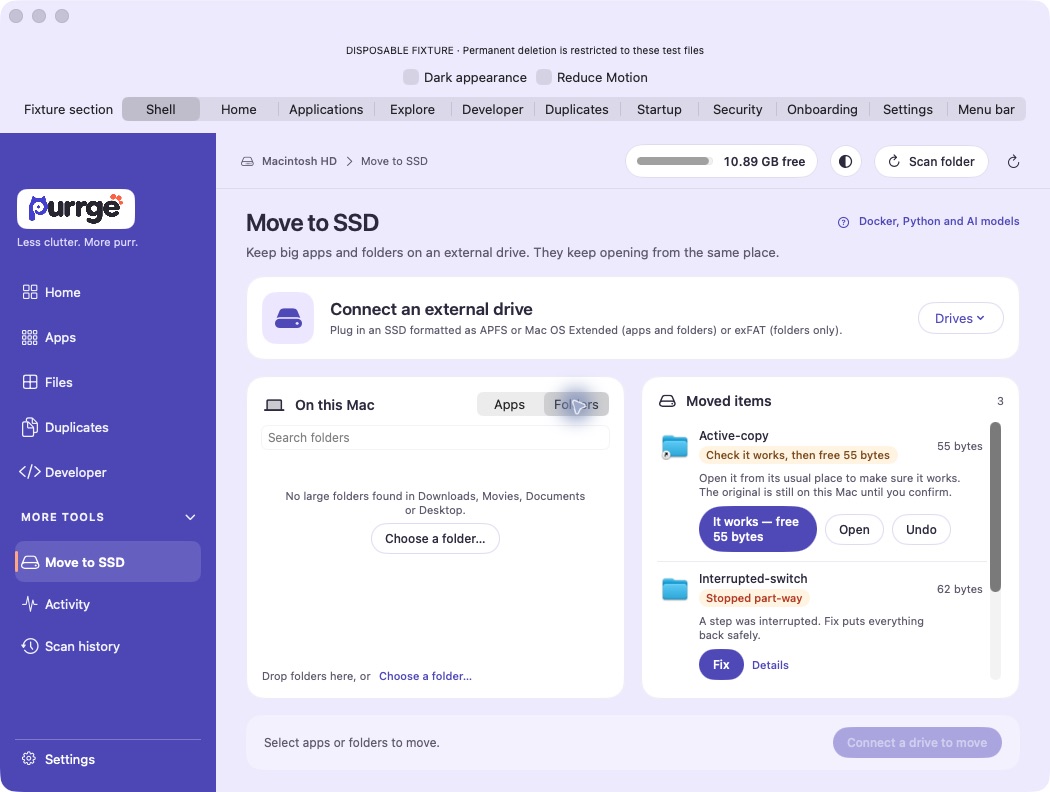
CleanMyMac’s Space Lens can scan internal and external drives, but scanning an external drive is a different job from relocating an app and preserving its launch path. We did not verify an equivalent managed relocation workflow in the official sources reviewed. That is a research limit, not proof that every edition lacks it.
Delete or relocate?
A build cache you can regenerate may be a cleanup candidate. A sound library you use every week may belong on an SSD. Start with whether you want to keep the content; a storage map alone cannot decide that for you.
Compatibility and cleanup updates
Purrge’s published Universal installer supports Intel and Apple Silicon Macs running macOS 14 or later. MacPaw currently lists macOS 11 or later for CleanMyMac. An older operating system may settle the choice before features do. Check the download requirements and MacPaw’s current requirements for your machine.
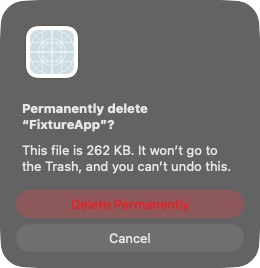
Purrge cleanup permanently deletes selected files after confirmation. They do not go to the Trash, and Purrge cannot undo that deletion. Check release details and contact support if you are unsure.
Keep a backup before removing files or relocating important content. Full Disk Access is optional in Purrge, and limited permissions can produce incomplete results. This comparison makes no claim that either product is universally safer, faster, or able to recover a particular amount of storage.
Which should you choose?
Consider Purrge when your priority is storage review, developer folders, or keeping eligible content on an external SSD. Its two-Mac, one-time licence may fit that narrower job. Start with the free review in the current 1.0.0 release, which includes the Quit & Clean cancellation fix.
Consider CleanMyMac when you want the broader maintenance suite, including malware protection and application updates, or need support for macOS 11–13. Check the edition you are buying. Its one-time purchase is a valid option if you prefer not to subscribe, with the major-version upgrade terms described above.
You may not need either app for a one-off tidy-up. If you already know which large downloads you can remove, Finder and macOS storage settings may be enough. A paid tool earns its place when its review or relocation workflow solves a recurring problem for you.
Start by seeing what’s there.
Download Purrge for a free scan and storage review. Read the cleanup limitation above before taking any removal action.
$14.50 once · 2 Macs · Lifetime updates
macOS 14+ · Intel and Apple Silicon · Explore CleanMyMac and its trial
Common questions
Is CleanMyMac subscription-only?
No. MacPaw offers monthly and annual subscriptions and a one-time purchase. The one-time option covers the purchased major version; subscriptions include future major upgrades while subscribed. Confirm the selected plan and device count in MacPaw’s store.
Is Purrge’s launch offer a lifetime licence?
Purrge’s published offer is a one-time licence for two Macs with lifetime updates. The $14.50 launch price is limited to the first 250 orders; the regular price is $29. Check current pricing and the final checkout amount.
Does Purrge replace malware protection?
No. Purrge is a storage utility, not an antivirus product. CleanMyMac advertises malware protection among its tools. Choose based on the capabilities you need; a storage cleanup comparison is not a security-product test.
Will either app make my Mac faster?
We have not run a controlled performance comparison. Freeing storage and removing unnecessary startup activity are different tasks, and results depend on your machine. No speed increase, amount of reclaimed space, or cleanup time is guaranteed by this article.
Sources and how we compared
Creative Sparks publishes this blog and develops Purrge. On 21 October 2026 we reviewed the shipped 1.0.0 build 21 release record, matching source, website terms, native test captures, and MacPaw’s documentation. On 22 October we replaced the test-host Home and Developer images with direct captures of the installed 1.0.0 build 20 app. No new scan or cleanup was run for those images. The separate final-warning capture uses a disposable file; the relocation illustration uses labelled sample state. We did not run a matched cleanup, malware-detection, or performance benchmark. The interactive demo is a simplified walkthrough with labelled demonstration data; it is not a screen recording or a claim about your Mac’s results.
MacPaw’s official product, licensing, system-junk and Space Lens sources were rechecked on 21 October 2026; regional store prices were checked on 21 October 2026. Prices and features may change. The regional MacPaw prices were observed in India; Purrge’s advertised dollar price was checked against its public pricing page. We did not complete a payment or independently verify remaining launch-offer redemptions.
- MacPaw — CleanMyMac store: pricing and system requirements
- MacPaw — One-time purchase or subscription
- MacPaw — Remove system junk
- MacPaw — Get started with Space Lens
- CleanMyMac — Product features and trial
- Purrge — Releases and download requirements
- Purrge — Current pricing and terms
Corrections welcome: contact Purrge support. CleanMyMac is a product of MacPaw; this article is not affiliated with or endorsed by MacPaw.